About us
Welcome to the « projets recherche connect.fr » overview page
On this page, you will find key information on how the
projets recherche connect.fr. service works and how to use it.
What is projets recherche connect.fr?
projets recherche connect.fr is a service that offers its partners a shared authentication system, enabling access to a range of partner applications.
This saves users from having to remember multiple usernames and passwords.
projets recherche connect.fr offers two login methods:
- By an ORCID account
- By a Projets Recherche Connect account (with a username and password)
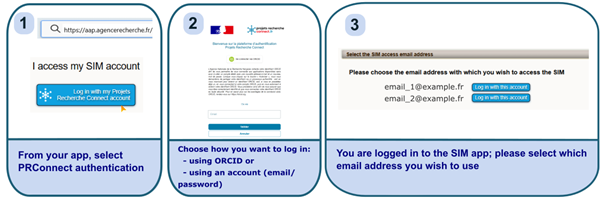
A user with multiple accounts on a partner site can add their various login email addresses to their projets recherche connect.fr account. This means that when they log in to the partner site via our platform, they can choose which email address to use to access the site.
How do I use the projets recherche connect.fr?
Let’s take SIM as an example of a partner application:
How does projets recherche connect.fr work?
projets recherche connect.fr offers two ways to create an account:
- By an ORCID login
Authorising access via ORCID to create a projets recherche connect.fr account allows you to transfer your surname, first name, primary email address and secondary email addresses to your projets recherche connect.fr account, thereby simplifying the process of adding email addresses to your account.
- By email
A projets recherche connect.fr account can be created directly using an email address and a password. Unlike when creating an account via ORCID, each email address must be added individually.
Each time a new email address is added to projets recherche connect.fr, a verification code will be sent to that email address; you will then need to enter it on the projets recherche connect.fr platform to verify the email address.
This list of email addresses linked to your
projets recherche connect.fr account will then be sent to the partner application you wish to log in to. You can then select the login email address you wish to use from those recognised by the application, and that’s it!